
COORDINATOR
CONNECT
Welcome to Toyota Industries Commercial Finance’s newsletter, The Coordinator Connect.
Here, we highlight top coordinators and bring you the latest news and insights on funding with TICF! Dive in by clicking on each article title using the navigation to the left, or by simply scrolling down.
COORDINATOR
CONNECT
Welcome to Toyota Industries Commercial Finance’s newsletter, The Coordinator Connect.
Here, we highlight top coordinators and bring you the latest news and insights on funding with TICF! Dive in by clicking on each article title using the navigation to the left, or by simply scrolling down.
COORDINATOR
CONNECT
Welcome to Toyota Industries Commercial Finance’s newsletter, The Coordinator Connect.
Here, we highlight top coordinators and bring you the latest news and insights on funding with TICF! Dive in by clicking on each article title using the navigation to the left, or by simply scrolling down.
Perfect Letter Perspective:
An Interview with Trenton Claycomb
Perfect Letter Perspective:
An Interview with Trenton Claycomb
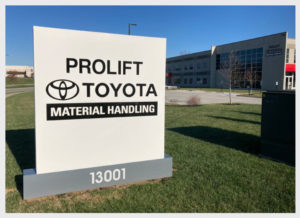
Recently, the TICF team spent time with Pro-Lift’s Trenton Claycomb to learn more about his unique perspective on our Perfect Letter Program, his tips for other Toyota sales coordinators, and the value of his relationship with us.
Trenton joined Pro-Lift two years ago and works as a Finance Sales Coordinator. This is a unique role within the forklift dealership model, and he is responsible for handling 100% of the leases, contacting customers, and ensuring compliance with all sales forms. Essentially, Trenton is the person with the deal and customer from start to finish.
 Initially, he was not aware of the Perfect Letter Program and its many benefits. After about six months at the dealership, Trenton realized the importance of the program and how it could strengthen the customer experience. Trenton educated himself on the guidelines and program terms, and started meeting bi-weekly with Scott Ashimine, Dolores Evangelista, Nic Viana, and Ernie Garcia. Within a month, he saw the value of the program, and within three months raised his Perfect Letter rates from the 70 percentile to the 90 percentile.
“The meetings are so powerful and helpful. We spend the time reviewing current examples of any deals that are still open, and it is a great time to ask any questions about processes and learn best practices too.”
The program, he says, stresses the importance of double checking the work and forms before submitting them to TICF to reduce any potential re-work and speeds up the funding process.
When asked about his advice and tips for fellow sales coordinators, he believes there is value in learning from mistakes and encourages regular and transparent communication with TICF. “Do not be afraid to ask TICF how to make it easier and ask lots of questions. Also, by focusing on the smaller details and paying attention to the program rules, you can maximize the program for you and your dealership’s benefit.”
When Trenton is not at work earning great Perfect Letter points, he is an avid sports fan. His favorite teams are the Indianapolis Colts, Indiana Pacers, and Kentucky Wildcats. Each year, he takes an annual road trip with his family to watch an SEC football game and has been to over half of the SEC stadiums so far.
Recently, the TICF team spent time with Pro-Lift’s Trenton Claycomb to learn more about his unique perspective on our Perfect Letter Program, his tips for other Toyota sales coordinators, and the value of his relationship with us.
Trenton joined Pro-Lift two years ago and works as a Finance Sales Coordinator. This is a unique role within the forklift dealership model, and he is responsible for handling 100% of the leases, contacting customers, and ensuring compliance with all sales forms. Essentially, Trenton is the person with the deal and customer from start to finish.
Initially, he was not aware of the Perfect Letter Program and its many benefits. After about six months at the dealership, Trenton realized the importance of the program and how it could strengthen the customer experience. Trenton educated himself on the guidelines and program terms, and started meeting bi-weekly with Scott Ashimine, Dolores Evangelista, Nic Viana, and Ernie Garcia. Within a month, he saw the value of the program, and within three months raised his Perfect Letter rates from the 70 percentile to the 90 percentile.
“The meetings are so powerful and helpful. We spend the time reviewing current examples of any deals that are still open, and it is a great time to ask any questions about processes and learn best practices too.”
Recently, the TICF team spent time with Pro-Lift’s Trenton Claycomb to learn more about his unique perspective on our Perfect Letter Program, his tips for other Toyota sales coordinators, and the value of his relationship with us.
Trenton joined Pro-Lift two years ago and works as a Finance Sales Coordinator. This is a unique role within the forklift dealership model, and he is responsible for handling 100% of the leases, contacting customers, and ensuring compliance with all sales forms. Essentially, Trenton is the person with the deal and customer from start to finish.
The program, he says, stresses the importance of double checking the work and forms before submitting them to TICF to reduce any potential re-work and speeds up the funding process.
When asked about his advice and tips for fellow sales coordinators, he believes there is value in learning from mistakes and encourages regular and transparent communication with TICF. “Do not be afraid to ask TICF how to make it easier and ask lots of questions. Also, by focusing on the smaller details and paying attention to the program rules, you can maximize the program for you and your dealership’s benefit.”
When Trenton is not at work earning great Perfect Letter points, he is an avid sports fan. His favorite teams are the Indianapolis Colts, Indiana Pacers, and Kentucky Wildcats. Each year, he takes an annual road trip with his family to watch an SEC football game and has been to over half of the SEC stadiums so far.
TAX BUTTON
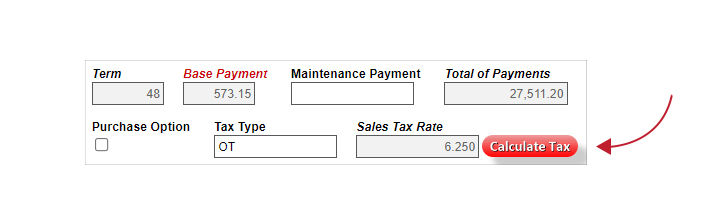
The Tax Button on the Asset Pricing tab in TC3 is required to be used when calculating your monthly payment to receive a Perfect Letter towards a funding. This should be used on any every commercial lease submitted to Funding unless the deal is tax exempt.
SURVEY REPORT
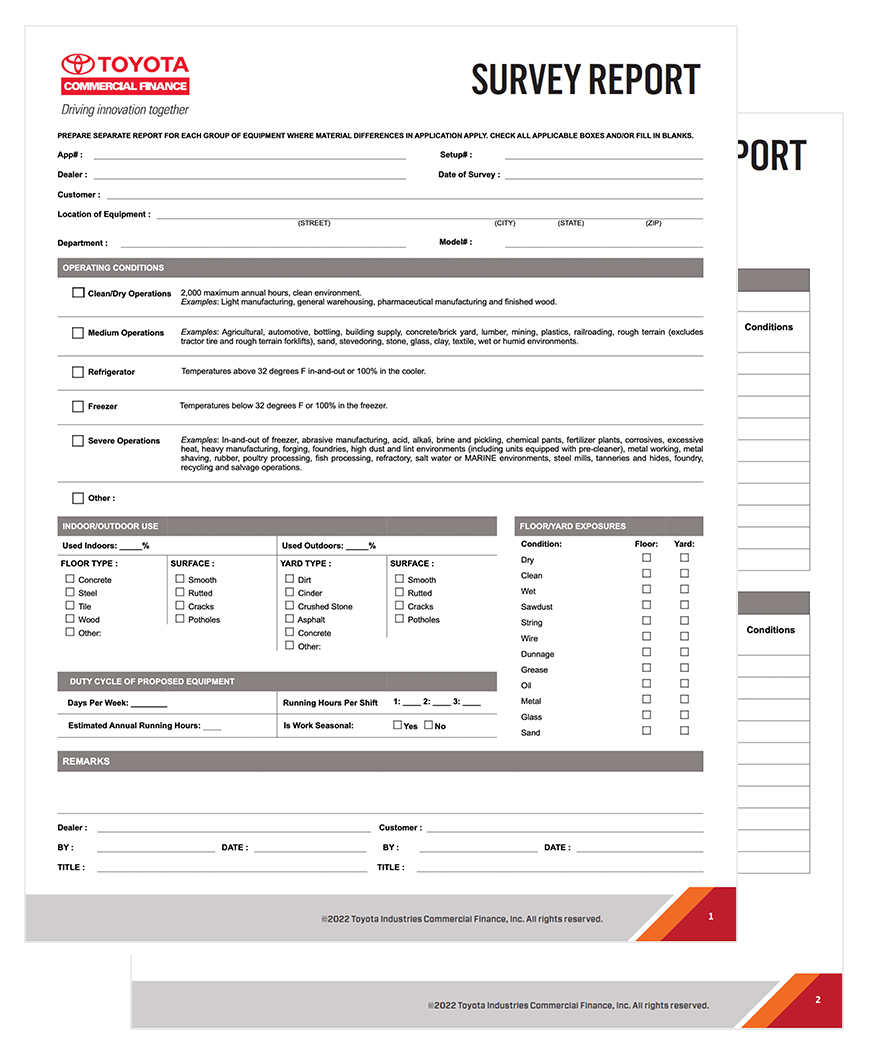
The Survey Report:
- Is required for all new customers.
- (Operating Leases only)
- Is valid until the working site condition for the customer is no longer accurate.
- Will only change if they change the way they do business or change the location of their operation.
- Helps the customer find which kind of equipment is best for them.
- Helps determine the wear and tear of the unit related to the residual value at the end of the lease term.
- Puts responsibility on the customer to provide accurate reporting of equipment usage and site location, and will incur penalties if used otherwise as to make up for additional diminished value.
The Survey Report:
- Is required for all new customers.
- (Operating Leases only)
- Is valid until the working site condition for the customer is no longer accurate.
- Will only change if they change the way they do business or change the location of their operation.
- Helps the customer find which kind of equipment is best for them.
- Helps determine the wear and tear of the unit related to the residual value at the end of the lease term.
- Puts responsibility on the customer to provide accurate reporting of equipment usage and site location, and will incur penalties if used otherwise as to make up for additional diminished value.
TC3 — A Year in Review
Over the past year, we have made several enhancements and updates to our TC3 system. All of these enhancements aim at continuously improving our processes and systems to be the best financial partner of choice to you, our valued dealers. Let’s take a look at some of our system enhancement highlights over the past year:
FEBRUARY 2022
Customer Search Functionality and Customer Profile Customization
In February 2022, TICF announced enhancements to the Customer Search functionality and the Customer Profile in TC3. This enhancement eliminated the chances of creating duplicate customer records in TC3, as all customers became viewable to dealers with limited information on customer search and guarantor search if not already linked to the dealer. This change helped to reduce redundant data entry and save time.
In an effort to help with customer billing issues, we also introduced new optional fields in the customer creation view as well as the Documentation step of the process. This change enabled you to create special billing requirements, identify how a customer wants billing consolidated, and select a specific day that the customer prefers for their monthly billing date.
In light of these updates, when you are creating a credit application for a customer that is new to your dealership, please follow the step-by-step guide below:
1) Type in the Fed Tax ID for the customer you are seeking to link and submit a credit app on behalf of. If the customer is already a current customer at your dealership, you may search by customer name.
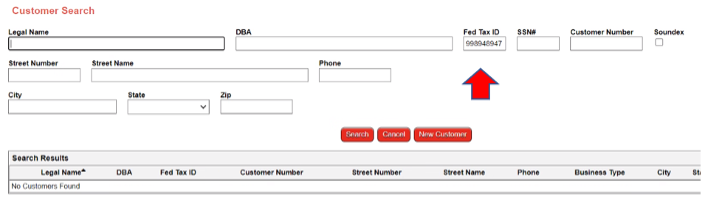
2) Since the customer is not linked, you will then be presented with a new page to confirm the Federal Tax/Social Security Number you have entered. Click “OK” once you verify the information is correct.

3) If there is a match based on the Federal Tax ID and the customer is an existing TICF customer, TC3 allows you to link the customer to your dealership. Click the “Magnify Glass” option to see the full list of your dealer codes.
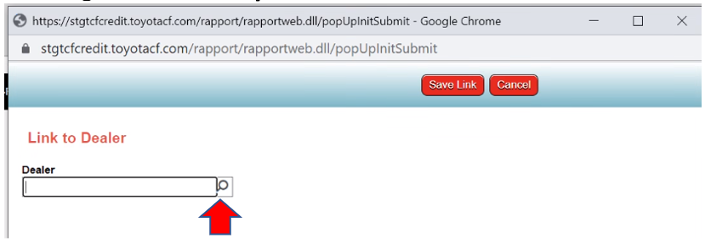
4) Click the Dealer code you want to link the customer to in TC3.
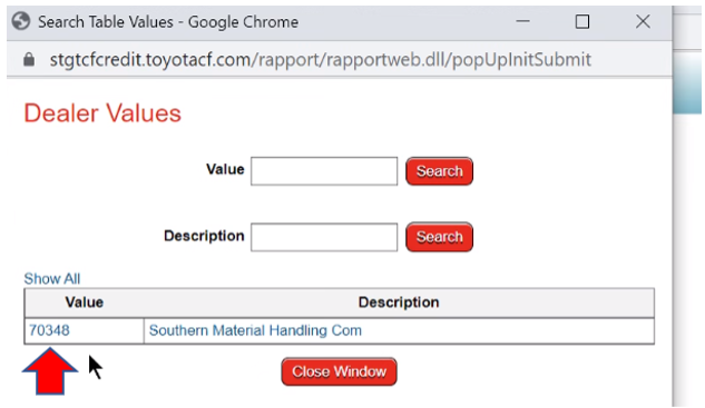
5) Click “Save Link” to complete the customer linking process.
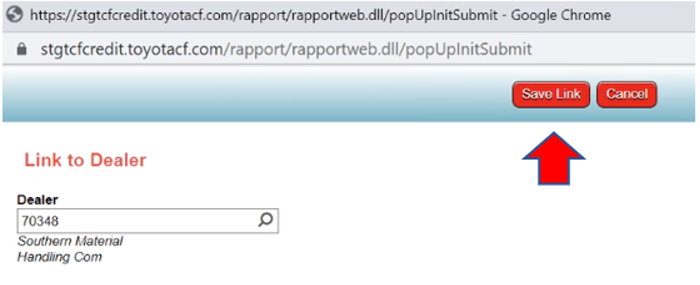
6) Once the customer is successfully linked to your chosen dealer code, you will see the records in your search results (see example below).
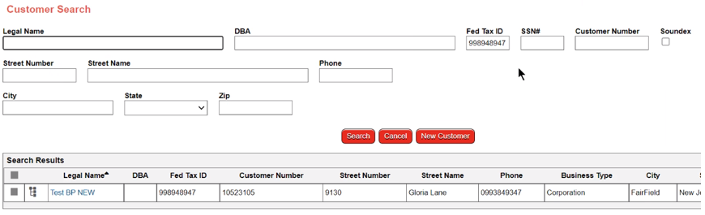
7) Hover your mouse over the icon (see below for example) and click “Create An Application” to proceed to the TICF credit application entry screen.
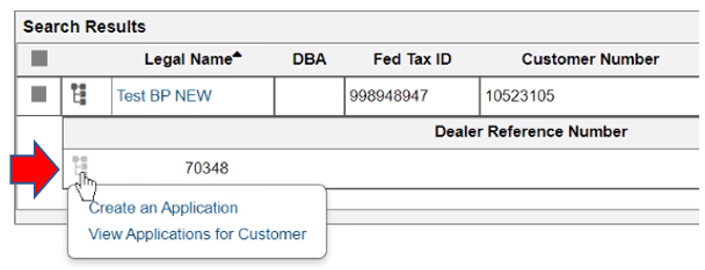
*If you create the credit application from this screen, it will correct any linking issues you may have experienced previously.
FEBRUARY 2022
Digital Customer Invoices
In February 2022, TICF announced all new customers would be automatically set up to receive email invoices as the standard form of delivery. This change gave our mutual customers a faster turnaround time in receiving their monthly invoices.
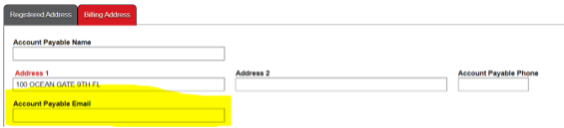
As a reminder, it is important that you obtain the proper email addresses for customers, as this information will be used to send the invoices. Additionally, accurate accounts payable information and correct email addresses help our mutual customers avoid account delinquency. Below is a screenshot of where a customer’s email address should be entered into TC3, for reference.
Invoices can still be sent out via postal service if the customer prefers or asks for that option instead.
Customer email address information will need to be included in either the TICF Customer Welcome Packet, funding checklist, or notated in the TC3 system.
FEBRUARY 2022
Certificate of Delivery & Acceptance
With this update, TICF announced improvements to the certificate of delivery and acceptance (CODA) process within TC3. As a reminder, the CODA documents are required for funding.
This update equipped you the choice of two different versions of the CODA document to support the needs of your current process.
The two-page CODA document streamlines the booking process by enabling earlier CODA document execution. Earlier execution is achieved by entering ‘See “CODA”’ in the Frame-Serial number field which populates a reference to the CODA document for Frame-Serial numbers in the Lease Schedule. This change eliminated the need to wait for serial numbers to be created before the lease schedule can be signed.
With this new document format, the one-page CODA document reduces the number of documents that need to be signed by the customer upon delivery.
Both documents contain efficiency improvements by combining the first payment due date and acceptance date fields to minimize keystrokes.
SEPTEMBER 2022
Address Validation & Improved Sales Tax Estimates
With this update, improved sales tax estimates and new address validation became available in TC3. This helped streamline the funding process by reducing the probability of disruptions resulting from sales tax-related errors.
Noted deficiencies in the Calculate Tax button were resolved, and the following changes were made for all lease contracts:
1) Down payment, non-taxable fees, and net trade-in variables were added to the estimated sales tax calculation.
2) ‘Total Amount Financed’ is systematically calculated based on the inputs of the fields listed above.
3) ‘Dealer Sales Price’ must accommodate the ‘Total Amount Financed’ calculation. The Easy Button was updated to automatically load ‘Net Price’ from the CRM into ‘Dealer Sales Price’.
4) Clicking the ‘Calculate Sales Tax’ was updated to display whether a deal contains upfront (OT) sales tax or monthly (MT) streaming sales tax based on jurisdiction requirements.
5) Clicking the ‘Asset Tax Exempt’ checkbox and providing the ‘Certificate Number’ was updated to zero out the sales tax calculation.
6) Estimated sales tax was updated to automatically recalculate if there are any changes to the location address.
OCTOBER 2022
Site Survey
In October 2022, TICF announced that a new version of the Site Survey was created and available for use in TC3. TICF streamlined the form to eliminate over 80 separate fields and checkboxes. The new form allows for a smoother and faster customer experience when filling out the operating conditions for their truck(s).
DECEMBER 2022
Address Validation with Zip Code +4 for Improved Sales Tax Estimates
As a follow up to the September 2022 update on improved sales tax estimates and new address validation in TC3, TICF corrected the issue in TC3 which caused an error of “Missing +4 on the Zip Code” even when the +4 was present. TC3 can now recognize the additional +4 when it is manually input. No additional action is required to accommodate for this system fix.
This improved address validation functionality helped to reduce errors and streamline the funding process by also reducing the probability of disruptions resulting from sales tax-related errors.
As a reminder, you only need to input the five character Zip Code, and TC3 will automatically validate and return the proper city, county, state, and zip +4. The validation of all addresses ensures accurate sales tax calculations while reducing potential delays to funding. Thanks to this update, now all addresses entered into applications and the Customer Maintenance screens are automatically validated and corrected with the proper zip +4.
FEBRUARY 2023
Estimated Sales Tax Improvements
TICF is excited to announce that sales tax calculations have been improved in TC3. As of February 2, 2023, TC3 now excludes trade-in values from the tax basis for units in the following states: AL, CA, IL, MA, MD, ME, MI, MT, NC, NH, NV, OH, OK, and RI. This latest change increases the accuracy of estimated sales tax and minimizes remittance errors. TICF already identified and corrected all impacted contracts prior to this release.
Additionally, the ‘Estimated Up Front Tax’ field is now editable for all Retail Installment Loans providing the ability to ensure accurate LTV% calculations by manually inputting the Upfront Sales Tax amount.
Over the past year, we have made several enhancements and updates to our TC3 system. All of these enhancements aim at continuously improving our processes and systems to be the best financial partner of choice to you, our valued dealers. Let’s take a look at some of our system enhancement highlights over the past year:
FEBRUARY 2022
Customer Search Functionality and Customer Profile Customization
In February 2022, TICF announced enhancements to the Customer Search functionality and the Customer Profile in TC3. This enhancement eliminated the chances of creating duplicate customer records in TC3, as all customers became viewable to dealers with limited information on customer search and guarantor search if not already linked to the dealer. This change helped to reduce redundant data entry and save time.
In an effort to help with customer billing issues, we also introduced new optional fields in the customer creation view as well as the Documentation step of the process. This change enabled you to create special billing requirements, identify how a customer wants billing consolidated, and select a specific day that the customer prefers for their monthly billing date.
In light of these updates, when you are creating a credit application for a customer that is new to your dealership, please follow the step-by-step guide below:
1) Type in the Fed Tax ID for the customer you are seeking to link and submit a credit app on behalf of. If the customer is already a current customer at your dealership, you may search by customer name.
2) Since the customer is not linked, you will then be presented with a new page to confirm the Federal Tax/Social Security Number you have entered. Click “OK” once you verify the information is correct.
3) If there is a match based on the Federal Tax ID and the customer is an existing TICF customer, TC3 allows you to link the customer to your dealership. Click the “Magnify Glass” option to see the full list of your dealer codes.
4) Click the Dealer code you want to link the customer to in TC3.
5) Click “Save Link” to complete the customer linking process.
6) Once the customer is successfully linked to your chosen dealer code, you will see the records in your search results (see example below).
7) Hover your mouse over the icon (see below for example) and click “Create An Application” to proceed to the TICF credit application entry screen.
*If you create the credit application from this screen, it will correct any linking issues you may have experienced previously.
FEBRUARY 2022
Digital Customer Invoices
In February 2022, TICF announced all new customers would be automatically set up to receive email invoices as the standard form of delivery. This change gave our mutual customers a faster turnaround time in receiving their monthly invoices.
As a reminder, it is important that you obtain the proper email addresses for customers, as this information will be used to send the invoices. Additionally, accurate accounts payable information and correct email addresses help our mutual customers avoid account delinquency. Below is a screenshot of where a customer’s email address should be entered into TC3, for reference.
Invoices can still be sent out via postal service if the customer prefers or asks for that option instead.
Customer email address information will need to be included in either the TICF Customer Welcome Packet, funding checklist, or notated in the TC3 system.
FEBRUARY 2022
Certificate of Delivery & Acceptance
With this update, TICF announced improvements to the certificate of delivery and acceptance (CODA) process within TC3. As a reminder, the CODA documents are required for funding.
This update equipped you the choice of two different versions of the CODA document to support the needs of your current process.
The two-page CODA document streamlines the booking process by enabling earlier CODA document execution. Earlier execution is achieved by entering ‘See “CODA”’ in the Frame-Serial number field which populates a reference to the CODA document for Frame-Serial numbers in the Lease Schedule. This change eliminated the need to wait for serial numbers to be created before the lease schedule can be signed.
With this new document format, the one-page CODA document reduces the number of documents that need to be signed by the customer upon delivery.
Both documents contain efficiency improvements by combining the first payment due date and acceptance date fields to minimize keystrokes.
SEPTEMBER 2022
Address Validation & Improved Sales Tax Estimates
With this update, improved sales tax estimates and new address validation became available in TC3. This helped streamline the funding process by reducing the probability of disruptions resulting from sales tax-related errors.
Noted deficiencies in the Calculate Tax button were resolved, and the following changes were made for all lease contracts:
1) Down payment, non-taxable fees, and net trade-in variables were added to the estimated sales tax calculation.
2) ‘Total Amount Financed’ is systematically calculated based on the inputs of the fields listed above.
3) ‘Dealer Sales Price’ must accommodate the ‘Total Amount Financed’ calculation. The Easy Button was updated to automatically load ‘Net Price’ from the CRM into ‘Dealer Sales Price’.
4) Clicking the ‘Calculate Sales Tax’ was updated to display whether a deal contains upfront (OT) sales tax or monthly (MT) streaming sales tax based on jurisdiction requirements.
5) Clicking the ‘Asset Tax Exempt’ checkbox and providing the ‘Certificate Number’ was updated to zero out the sales tax calculation.
6) Estimated sales tax was updated to automatically recalculate if there are any changes to the location address.
OCTOBER 2022
Site Survey
In October 2022, TICF announced that a new version of the Site Survey was created and available for use in TC3. TICF streamlined the form to eliminate over 80 separate fields and checkboxes. The new form allows for a smoother and faster customer experience when filling out the operating conditions for their truck(s).
DECEMBER 2022
Address Validation with Zip Code +4 for Improved Sales Tax Estimates
As a follow up to the September 2022 update on improved sales tax estimates and new address validation in TC3, TICF corrected the issue in TC3 which caused an error of “Missing +4 on the Zip Code” even when the +4 was present. TC3 can now recognize the additional +4 when it is manually input. No additional action is required to accommodate for this system fix.
This improved address validation functionality helped to reduce errors and streamline the funding process by also reducing the probability of disruptions resulting from sales tax-related errors.
As a reminder, you only need to input the five character Zip Code, and TC3 will automatically validate and return the proper city, county, state, and zip +4. The validation of all addresses ensures accurate sales tax calculations while reducing potential delays to funding. Thanks to this update, now all addresses entered into applications and the Customer Maintenance screens are automatically validated and corrected with the proper zip +4.
FEBRUARY 2023
Estimated Sales Tax Improvements
TICF is excited to announce that sales tax calculations have been improved in TC3. As of February 2, 2023, TC3 now excludes trade-in values from the tax basis for units in the following states: AL, CA, IL, MA, MD, ME, MI, MT, NC, NH, NV, OH, OK, and RI. This latest change increases the accuracy of estimated sales tax and minimizes remittance errors. TICF already identified and corrected all impacted contracts prior to this release.
Additionally, the ‘Estimated Up Front Tax’ field is now editable for all Retail Installment Loans providing the ability to ensure accurate LTV% calculations by manually inputting the Upfront Sales Tax amount.
Helpful Tips
Serial Number Entry for Wholesale Obligation
- Inputting Invoice Number from TMHU Invoice on the Serial/VIN tab for the opportunity to subtract the wholesale obligation from Funding
- As a reminder, when using the Easy Button, the system will link the Opportunity ID with the setup and automatically pull in the Frame/Serial Number, once it is made available by TMH.
Required vs. Optional in TC3
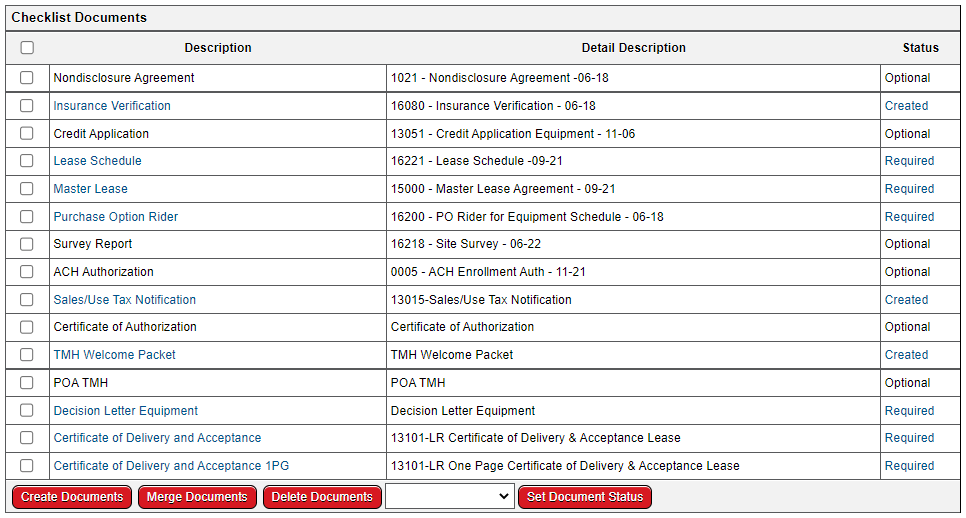
- TC3 Documents window will show which documents are “required” or “optional” for Funding.
- It is easy way to miss Guaranties, Survey, CODA, etc. if you are not careful, but always be sure to reference your decision letter should you be unsure if a document is needed.
Serial Number Entry for Wholesale Obligation
- Inputting Invoice Number from TMHU Invoice on the Serial/VIN tab for the opportunity to subtract the wholesale obligation from Funding
- As a reminder, when using the Easy Button, the system will link the Opportunity ID with the setup and automatically pull in the Frame/Serial Number, once it is made available by TMH.
Required vs. Optional in TC3
- TC3 Documents window will show which documents are “required” or “optional” for Funding.
- It is easy way to miss Guaranties, Survey, CODA, etc. if you are not careful, but always be sure to reference your decision letter should you be unsure if a document is needed.